AWS Integration - Script Runner and Terraform
Collect evidence from AWS using Script Runner or Terraform data blocks
Written By Micah Spieler
With the AWS integration, you can collect evidence of your AWS configurations directly from your cloud infrastructure. This integration supports two collection methods — Script Runner and Terraform — so you can choose the approach that best fits what you're trying to collect. Both methods use the same authentication setup and support automated collection. Read more about our Terraform integrations.
Types of evidence you might collect
There are a lot of different types of evidence you can collect from AWS. <a href="https://help.strikegraph.com/en/articles/15024407-script-runner-for-integrations" target="_blank">Script Runner makes it easy to collect common evidence types using pre-built scripts, and is just as powerful when used with custom scripts for more advanced needs. Terraform data blocks offer an alternative collection method using HCL, limited to the data sources supported by the AWS provider. Important note: You do not need to use Terraform in your tech stack in order to use this integration.
Here is a non-exhaustive short list of some of the possible evidence you may collect from Terraform for AWS:
User access lists
Database encryption settings
Firewall rules
plus many more
Setting up the integration
To configure the Terraform integration with AWS, you (or someone in your organization) will need access and permissions to configure new AWS IAM roles and policies.
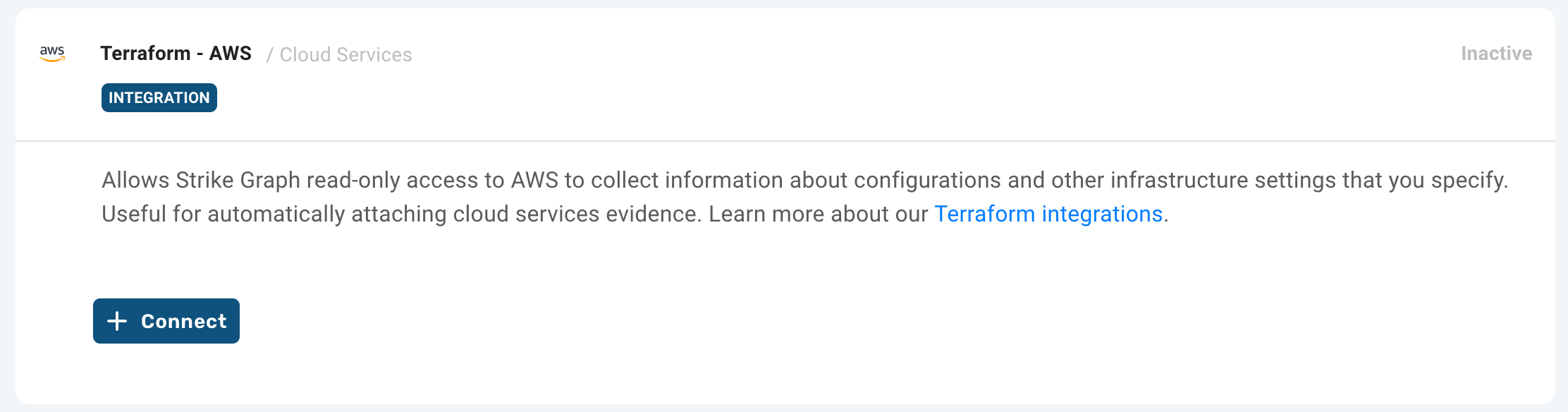
Get started by navigating to the Integration Manager in Strike Graph and opening the Terraform for AWS integration. Note: if you do not see this integration listed, it may not be available for your organization or role.
Click on the “+ Connect” button to begin configuring a new integration.
Next, in your AWS Console, configure a new read-only role and policy within your AWS account that Strike Graph can use to collect evidence from your AWS systems.
Some quick definitions:
IAM Role: the AWS IAM role will include a Trust Policy that provides Strike Graph with temporary credentials to access specific data sources as defined in the policy.
Policy: an AWS policy can be associated with an IAM Role, and grants specific permissions.
To configure the Terraform for AWS integration, you will need to define an IAM Role and Policy.
Creating a new IAM Role and Policy in AWS
Set up a new policy and role in your AWS management console with the following IDs. The policy should provide read-only access to the resources you want to use in Strike Graph.
You will need two pieces of information to set up the AWS Role and Trust Policy.
Strike Graph's integration AWS account number
The external ID that is associated with your organization's Strike Graph account.
Both of these variables can be grabbed from the Integrations Manager component.
Create the Role in AWS
In your AWS console:
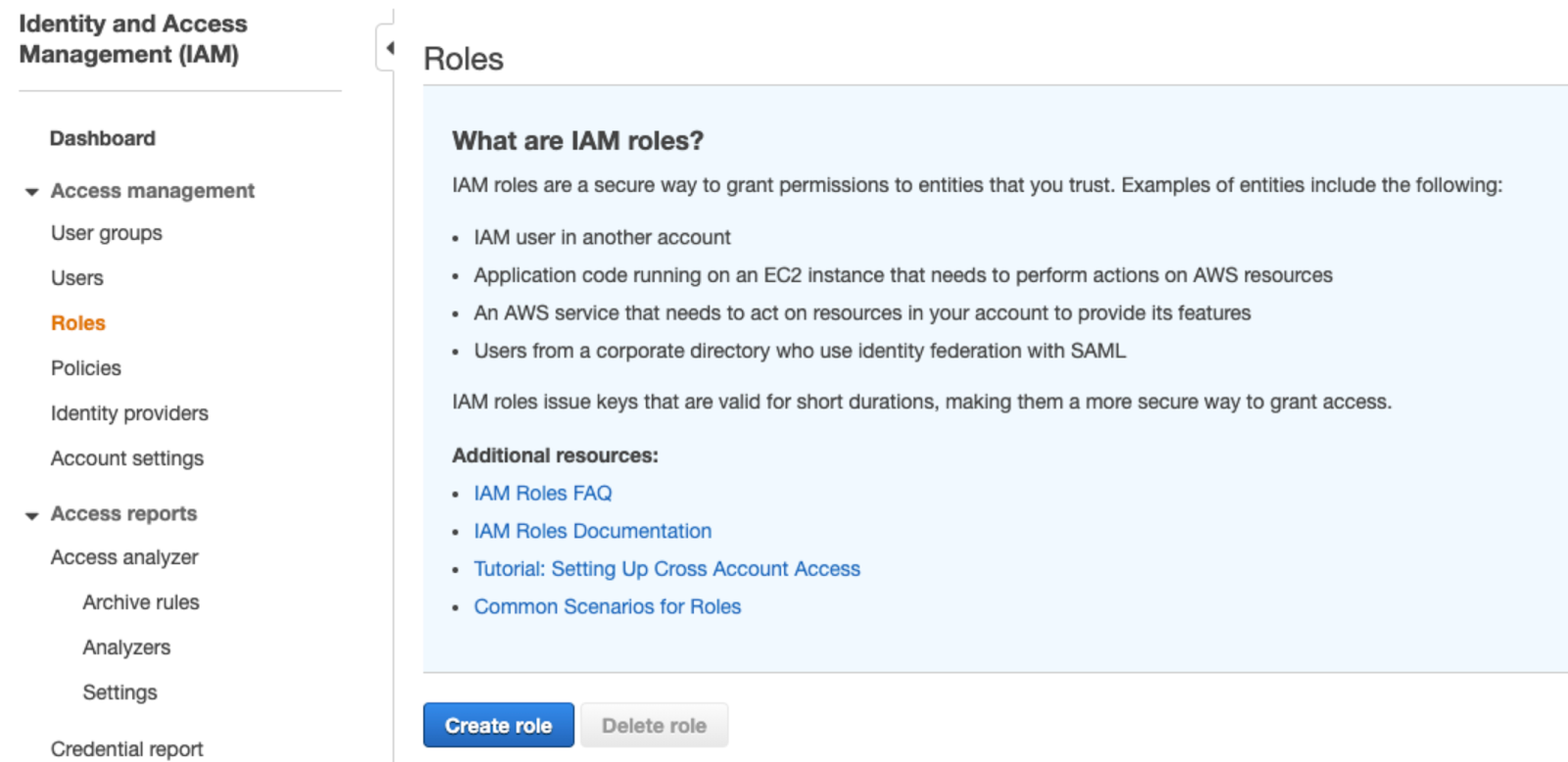
Navigate to Services → IAM → Roles and then find and click on the "Create role" button.
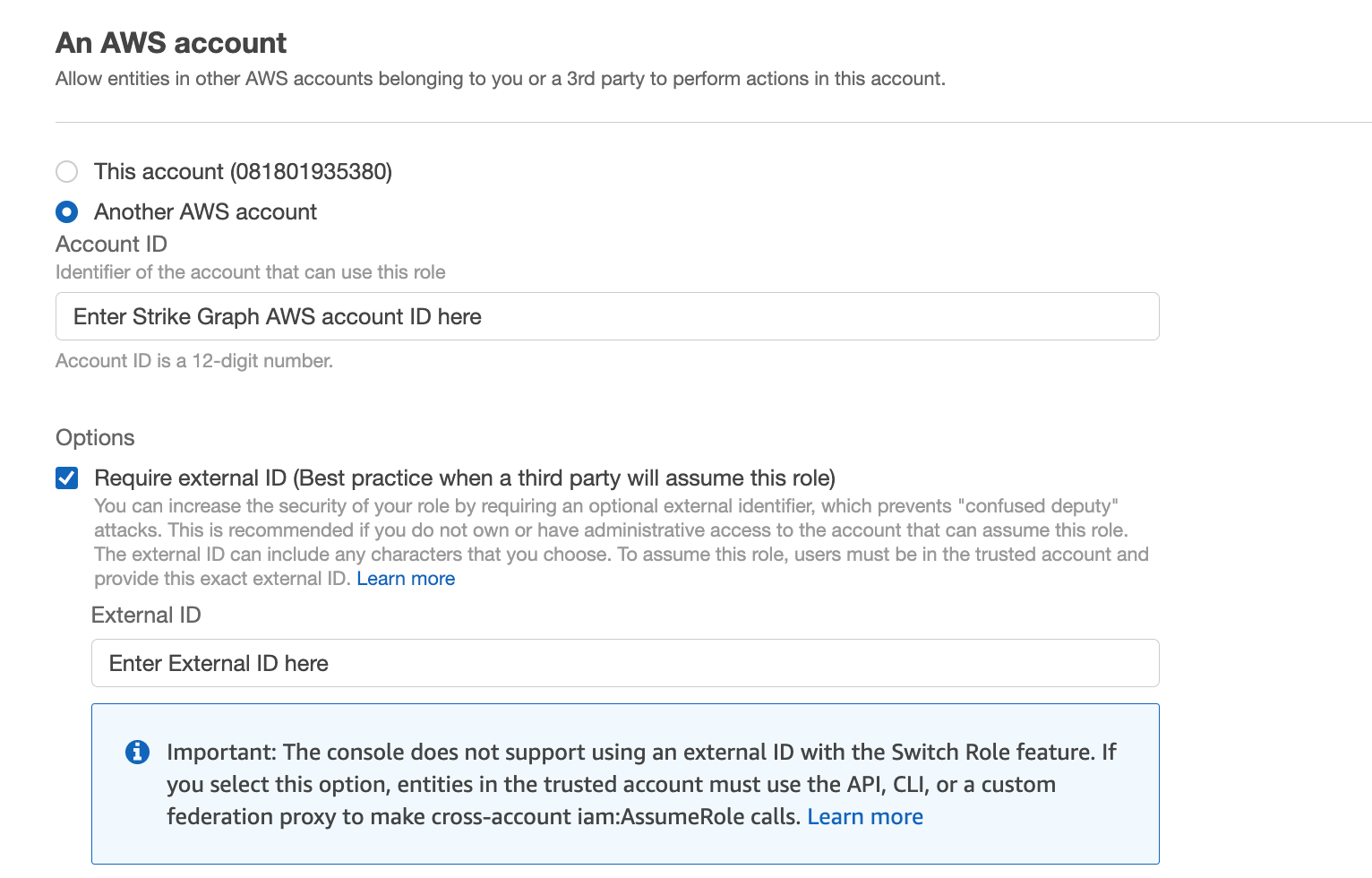
Under "Trusted entity type" select "AWS account" and then “Another AWS account” and then enter the Strike Graph AWS account ID (from Integrations Manager) under "Account ID".
On the same screen, select the “Require external ID” option and enter the Strike Graph External ID (also from Integrations Manager) under "External ID".
Click "Next" in the bottom right to advance to the next screen. This page will allow you to create an associated permissions policy.
Assign read-only permissions
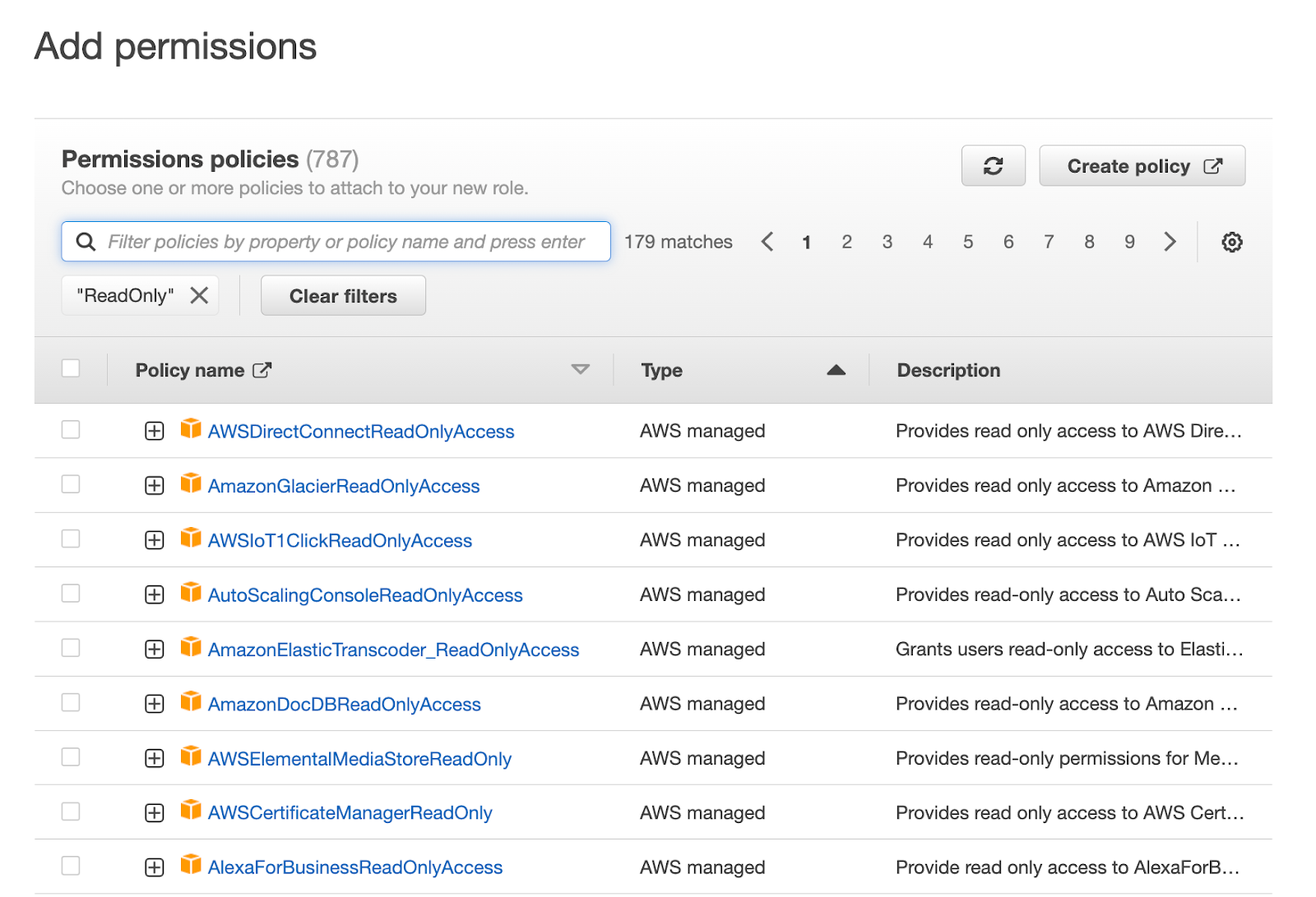
On the permissions page, you can either create your own custom policy, or select from the pre-defined AWS managed permission policies.
If you know ahead of time which systems you want to collect evidence from, you can add policies at this point, otherwise you can come back later and add new policies at a later date.
Remember: For proper security, only assign read-only permissions to this role, as that is all that is required for evidence collection.
Name, review, and create the role
On the final page, supply your new Role with a name and description (something like “Role for Strike Graph evidence collection” works) and then click the “Create role” button.
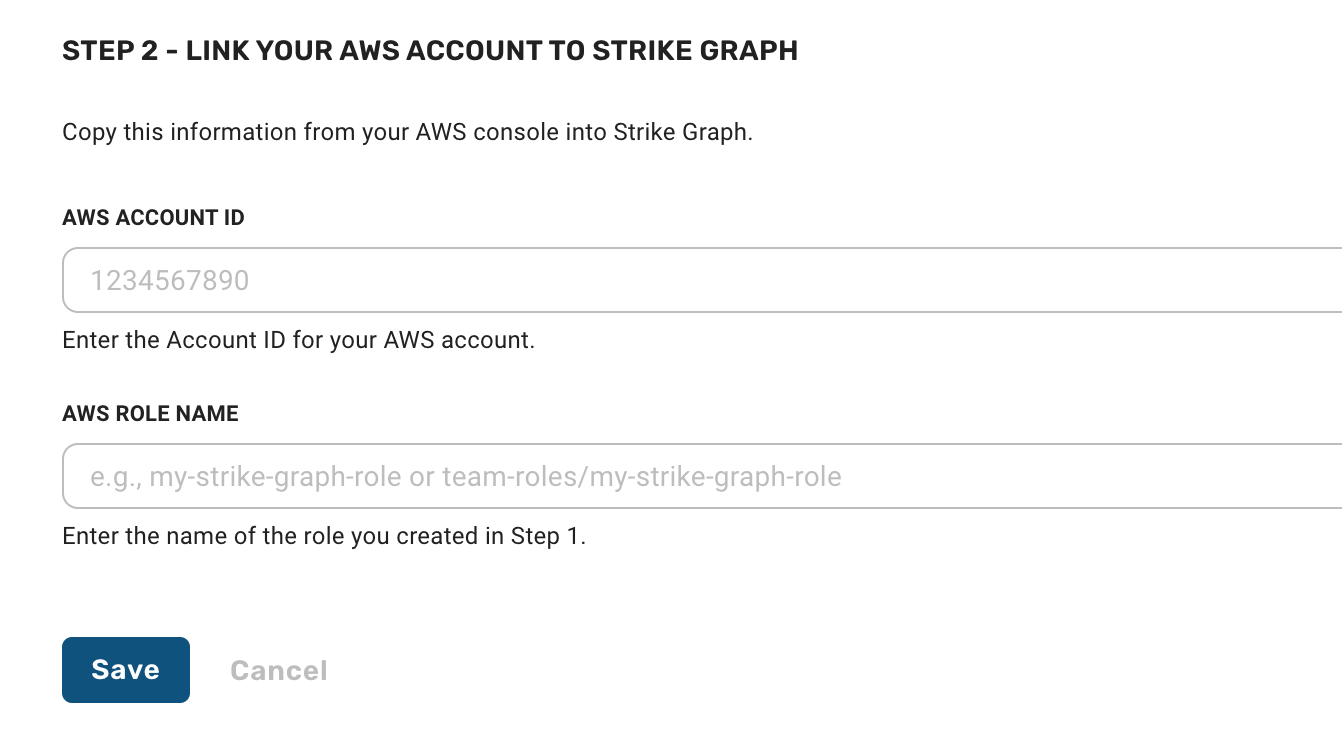
Back in the Strike Graph interface, enter your AWS Account ID and the name of the role that you just created and click the “Save” button to finalize the configuration of the integration.
Collecting evidence
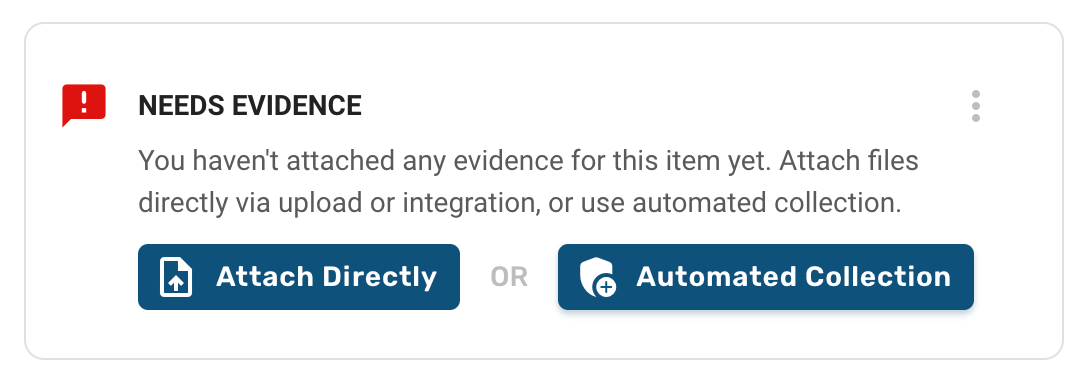
Once your integration is configured, navigate to the evidence item you want to collect for and click Attach Directly or Automated Collection. Select your AWS - Scripts & Terraform integration from the list of available integrations.
The evidence collection form has two tabs: Scripts and Terraform. Choose the method that works best for your needs.
Using Script Runner
The Scripts tab lets you collect evidence using Strike Graph's library of pre-built compliance collection scripts. No code required — just search, preview, and run.
Select the Scripts tab.
Select the AWS Region where your resources are located.
Use the search box to find a relevant script. The search is pre-populated with your evidence item's name as a starting point, but you can adjust as needed.
Browse the results. Each script card displays the script name, category, a short description, and the AWS services it targets.
Optionally, click Preview on any script card to review its full details and source code before running it.
Click Run to execute the collection.
Strike Graph will run the script against your AWS environment and attach the results to your evidence item. Once finished, the modal will close and the collected data will appear as an attachment.
Writing custom scripts (Advanced)
If the pre-built scripts don't cover your needs, you can write your own Python script using the Advanced button at the top of the Scripts tab. Custom scripts use boto3 and must be read-only — write operations are blocked before execution.
Using Terraform Data Blocks
The Terraform tab lets you write your own HCL data blocks to collect from specific AWS data sources. This approach gives you the most flexibility and is well suited for evidence types that aren't covered by the available scripts.
Terraform integrations use "data blocks" to define what data to collect. More information about data blocks and local values can be found on the Terraform overview page. With Terraform for AWS, you can collect evidence from almost any AWS resource. A list of available data sources is at the bottom of this page and on the Terraform AWS provider page.
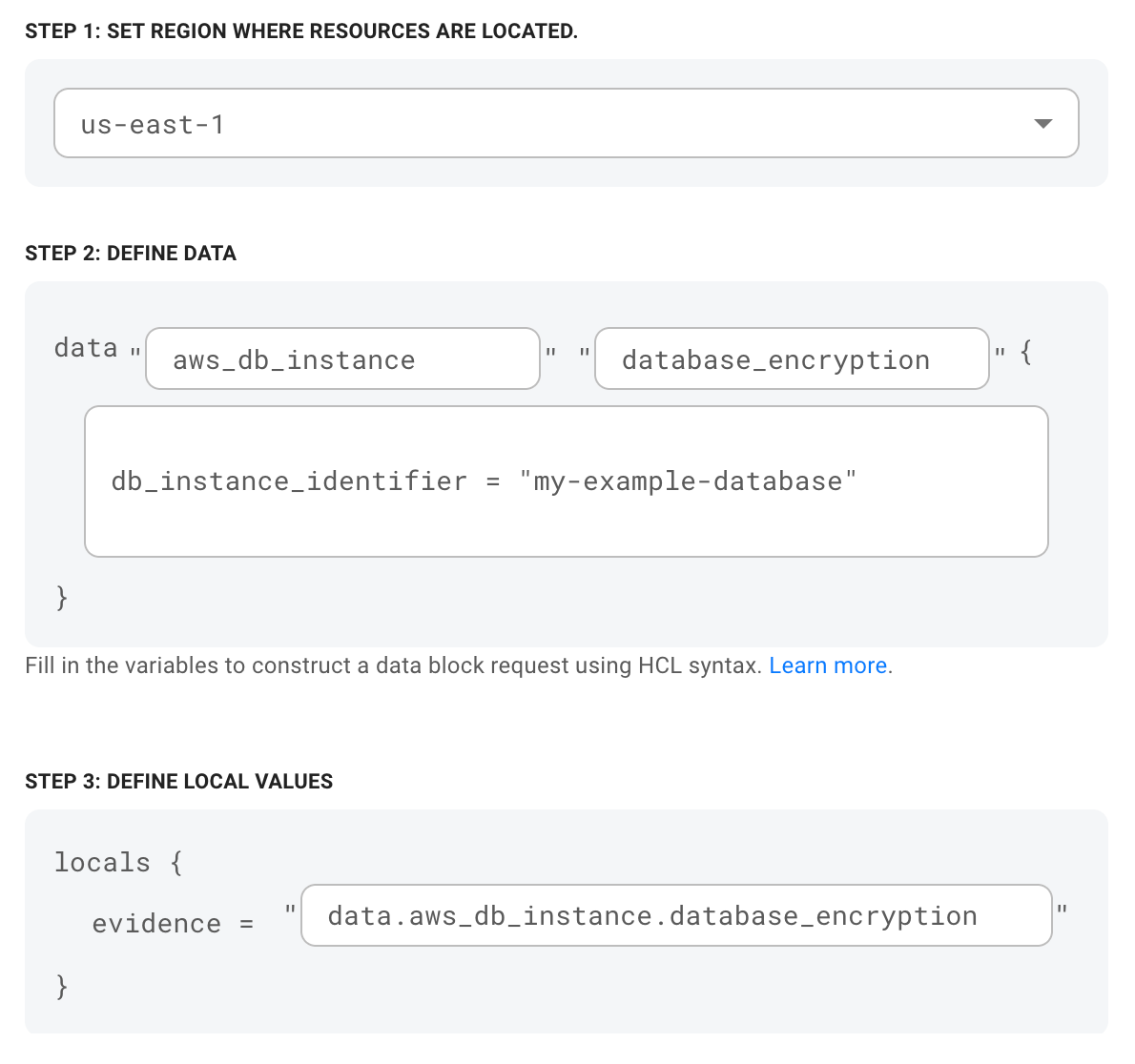
Step 1: Define which region the resource is in that you want to collect data from.
Step 2: Define the data block. Data blocks are very extensible, but follow a typical pattern:
data_source: this defines which AWS resource we should read from. Terraform for AWS supports data collection from any resource with a supported data source from Terraform's AWS provider (see below for a list).
temp_name: this is a temporary name you define and is used to refer to this data block during execution. It only has labeling significance within the scope of this configuration. The temp name is used in the output's filename, so it's recommended that you name it with something recognizable. Names can be repeated across configurations, are limited to alphanumeric characters, and do not allow spaces.
query constraints / attribute arguments – Many data sources require specific attribute(s) to be included (like the name of the resource you're pulling data from), or provide methods for constraining the data based on specific queries so that you can tailor the output. These are written as a key/value pairs and can include multiple arguments as accepted by the data source. Refer to the specific data source requirements in the Terraform AWS provider documentation.
Step 3: Define the local values used for the execution. This also follows a typical pattern that is derived from the data block: data.data_source.temp_name
Run the data collection
After you have defined the data block and local values, click the "Attach" button to execute the data collection. This may take a few minutes as we set up the data pipeline to collect the attachment.
Once the collection is finished, the attachment modal will close and you can see the collected data has been added to the evidence. You can confirm what was collected by clicking on the attachment to view the data.
Automated Collection
It is highly recommended that you configure your evidence collection with automated collection. With Automated Collection, Strike Graph can recollect evidence attachments from your AWS infrastructure a few days before expiration so that your evidence remains in an effective 'audit ready' state.
To configure your evidence with Automated Collection, follow the steps above after clicking on the "Automated Collection" button found on the evidence item detail pages. Additional information about Automated Collection is available here.
Removing your AWS integration
You can remove the integration at any time. Please note that removing an integration does not delete any files that were attached used during that integration. Removing an integration may also disrupt automated collection.
To remove:
Go to the Integrations Manager and click on the AWS integration card to access the integration configurations.
Click the "Deactivate" button next to your configuration.
Note: You may have access to remove integrations for other users on your team.
If you are fully removing access between Strike Graph and your AWS system, it's recommended that you also disable (or delete) the IAM role and policy that you set up during configuration from the AWS console.
Troubleshooting
For additional Terraform troubleshooting tips, click here.
Terraform integrations will return an error if we were unable to execute the collection request. The errors returned will be different depending on which step of the collection failed.
General formatting errors
If the message returned is pretty generic (like "Something went wrong") it may be a formatting issue. Check that your temp_name is formatted correctly (no spaces, only alphanumeric characters) and that there are not any other unexpected characters or formatting issues in the data block or local values.
Check permissions
If it is a permissions error, ensure that you have given Strike Graph the necessary read-only permissions in the IAM role that you set up for the integration. It should include permission to read from the data_source that you defined in the data block.
Confirm the data_source requirements
Check that the resource you defined in the data_source is available from AWS Terraform provider, and ensure that you have included any required query constraints / attribute arguments.
Confirm the local values
Confirm that the local values is formatted correctly. Typically, the local value should start with "data" (as described above) and include the data_source and temp_name. Check that the data_source and temp_name values are the same between the data block and local values.
The long list of supported AWS data sources
The following list is a snapshot of supported data sources from the AWS Terraform provider. For up to date support and specific data source requirements, visit the Terraform documentation.
ACM (Certificate Manager)
• aws_acm_certificate
ACM PCA (Certificate Manager Private Certificate Authority)
• aws_acmpca_certificate
• aws_acmpca_certificate_authority
API Gateway
• aws_api_gateway_api_key
• aws_api_gateway_domain_name
• aws_api_gateway_export
• aws_api_gateway_resource
• aws_api_gateway_rest_api
• aws_api_gateway_sdk
• aws_api_gateway_vpc_link
API Gateway V2
• aws_apigatewayv2_api
• aws_apigatewayv2_apis
• aws_apigatewayv2_export
App Mesh
• aws_appmesh_mesh
• aws_appmesh_virtual_service
Application Auto Scaling
• aws_autoscaling_group
• aws_autoscaling_groups
• aws_launch_configuration
Backup
• aws_backup_framework
• aws_backup_plan
• aws_backup_report_plan
• aws_backup_selection
• aws_backup_vault
Batch
• aws_batch_compute_environment
• aws_batch_job_queue
• aws_batch_scheduling_policy
CE (Cost Explorer)
• aws_ce_cost_category
• aws_ce_tags
Cloud Control API
• aws_cloudcontrolapi_resource
Cloud Map
• aws_service_discovery_dns_namespace
CloudFormation
• aws_cloudformation_export
• aws_cloudformation_stack
• aws_cloudformation_type
CloudFront
• aws_cloudfront_cache_policy
• aws_cloudfront_distribution
• aws_cloudfront_function
• aws_cloudfront_log_delivery_canonical_user_id
• aws_cloudfront_origin_access_identities
• aws_cloudfront_origin_access_identity
• aws_cloudfront_origin_request_policy
• aws_cloudfront_realtime_log_config
• aws_cloudfront_response_headers_policy
CloudHSM
• aws_cloudhsm_v2_cluster
CloudTrail
• aws_cloudtrail_service_account
CloudWatch Logs
• aws_cloudwatch_log_group
• aws_cloudwatch_log_groups
CodeArtifact
• aws_codeartifact_authorization_token
• aws_codeartifact_repository_endpoint
CodeCommit
• aws_codecommit_approval_rule_template
• aws_codecommit_repository
CodeStar Connections
• aws_codestarconnections_connection
Cognito IDP (Identity Provider)
• aws_cognito_user_pool_client
• aws_cognito_user_pool_clients
• aws_cognito_user_pool_signing_certificate
• aws_cognito_user_pools
Connect
• aws_connect_bot_association
• aws_connect_contact_flow
• aws_connect_contact_flow_module
• aws_connect_hours_of_operation
• aws_connect_instance
• aws_connect_lambda_function_association
• aws_connect_prompt
• aws_connect_queue
• aws_connect_quick_connect
• aws_connect_routing_profile
• aws_connect_security_profile
• aws_connect_user_hierarchy_structure
Cost and Usage Report
• aws_cur_report_definition
DS (Directory Service)
• aws_directory_service_directory
Data Pipeline
• aws_datapipeline_pipeline
• aws_datapipeline_pipeline_definition
Direct Connect
• aws_dx_connection
• aws_dx_gateway
• aws_dx_location
• aws_dx_locations
DocDB (DocumentDB)
• aws_docdb_engine_version
• aws_docdb_orderable_db_instance
DynamoDB
• aws_dynamodb_table
EBS (EC2)
• aws_ebs_default_kms_key
• aws_ebs_encryption_by_default
• aws_ebs_snapshot
• aws_ebs_snapshot_ids
• aws_ebs_volume
• aws_ebs_volumes
EC2 (Elastic Compute Cloud)
• aws_ami
• aws_ami_ids
• aws_availability_zone
• aws_availability_zones
• aws_ec2_host
• aws_ec2_instance_type
• aws_ec2_instance_type_offering
• aws_ec2_instance_type_offerings
• aws_ec2_instance_types
• aws_ec2_serial_console_access
• aws_ec2_spot_price
• aws_eip
• aws_eips
• aws_instance
• aws_instances
• aws_key_pair
• aws_launch_template
EC2 Image Builder
• aws_imagebuilder_component
• aws_imagebuilder_components
• aws_imagebuilder_container_recipe
• aws_imagebuilder_container_recipes
• aws_imagebuilder_distribution_configuration
• aws_imagebuilder_distribution_configurations
• aws_imagebuilder_image
• aws_imagebuilder_image_pipeline
• aws_imagebuilder_image_pipelines
• aws_imagebuilder_image_recipe
• aws_imagebuilder_image_recipes
• aws_imagebuilder_infrastructure_configuration
• aws_imagebuilder_infrastructure_configurations
ECR (Elastic Container Registry)
• aws_ecr_authorization_token
• aws_ecr_image
• aws_ecr_repository
ECR Public
• aws_ecrpublic_authorization_token
ECS (Elastic Container)
• aws_ecs_cluster
• aws_ecs_container_definition
• aws_ecs_service
• aws_ecs_task_definition
EFS (Elastic File System)
• aws_efs_access_point
• aws_efs_access_points
• aws_efs_file_system
• aws_efs_mount_target
EKS (Elastic Kubernetes)
• aws_eks_addon
• aws_eks_addon_version
• aws_eks_cluster
• aws_eks_cluster_auth
• aws_eks_clusters
• aws_eks_node_group
• aws_eks_node_groups
ELB (Elastic Load Balancing)
• aws_lb
• aws_lb_hosted_zone_id
• aws_lb_listener
• aws_lb_target_group
ELB Classic
• aws_elb
• aws_elb_hosted_zone_id
• aws_elb_service_account
EMR
• aws_emr_release_labels
EMR Containers
• aws_emrcontainers_virtual_cluster
ElastiCache
• aws_elasticache_cluster
• aws_elasticache_replication_group
• aws_elasticache_user
Elastic Beanstalk
• aws_elastic_beanstalk_application
• aws_elastic_beanstalk_hosted_zone
• aws_elastic_beanstalk_solution_stack
Elasticsearch
• aws_elasticsearch_domain
EventBridge
• aws_cloudwatch_event_bus
• aws_cloudwatch_event_connection
• aws_cloudwatch_event_source
Global Accelerator
• aws_globalaccelerator_accelerator
Glue
• aws_glue_connection
• aws_glue_data_catalog_encryption_settings
• aws_glue_script
GuardDuty
• aws_guardduty_detector
IAM (Identity & Access Management)
• aws_iam_account_alias
• aws_iam_group
• aws_iam_instance_profile
• aws_iam_instance_profiles
• aws_iam_openid_connect_provider
• aws_iam_policy
• aws_iam_policy_document
• aws_iam_role
• aws_iam_roles
• aws_iam_saml_provider
• aws_iam_server_certificate
• aws_iam_session_context
• aws_iam_user
• aws_iam_user_ssh_key
• aws_iam_users
Inspector
• aws_inspector_rules_packages
IoT Core
• aws_iot_endpoint
KMS (Key Management)
• aws_kms_alias
• aws_kms_ciphertext
• aws_kms_key
• aws_kms_public_key
• aws_kms_secret
• aws_kms_secrets
Kendra
• aws_kendra_faq
• aws_kendra_index
Kinesis
• aws_kinesis_stream
• aws_kinesis_stream_consumer
Kinesis Firehose
• aws_kinesis_firehose_delivery_stream
Lake Formation
• aws_lakeformation_data_lake_settings
• aws_lakeformation_permissions
• aws_lakeformation_resource
Lambda
• aws_lambda_alias
• aws_lambda_code_signing_config
• aws_lambda_function
• aws_lambda_function_url
• aws_lambda_invocation
• aws_lambda_layer_version
Lex Model Building
• aws_lex_bot
• aws_lex_bot_alias
• aws_lex_intent
• aws_lex_slot_type
Location
• aws_location_map
• aws_location_place_index
MQ
• aws_mq_broker
• aws_mq_broker_instance_type_offerings
Managed Grafana
• aws_grafana_workspace
Managed Streaming for Kafka
• aws_msk_broker_nodes
• aws_msk_cluster
• aws_msk_configuration
• aws_msk_kafka_version
Managed Streaming for Kafka Connect
• aws_mskconnect_connector
• aws_mskconnect_custom_plugin
• aws_mskconnect_worker_configuration
MemoryDB for Redis
• aws_memorydb_acl
• aws_memorydb_cluster
• aws_memorydb_parameter_group
• aws_memorydb_snapshot
• aws_memorydb_subnet_group
• aws_memorydb_user
Meta Data Sources
• aws_arn
• aws_billing_service_account
• aws_default_tags
• aws_ip_ranges
• aws_partition
• aws_region
• aws_regions
• aws_service
Neptune
• aws_neptune_engine_version
• aws_neptune_orderable_db_instance
Network Manager
• aws_networkmanager_connection
• aws_networkmanager_connections
• aws_networkmanager_core_network_policy_document
• aws_networkmanager_device
• aws_networkmanager_devices
• aws_networkmanager_global_network
• aws_networkmanager_global_networks
• aws_networkmanager_link
• aws_networkmanager_links
• aws_networkmanager_site
• aws_networkmanager_sites
OpenSearch
• aws_opensearch_domain
Organizations
• aws_organizations_delegated_administrators
• aws_organizations_delegated_services
• aws_organizations_organization
• aws_organizations_organizational_units
• aws_organizations_resource_tags
Outposts
• aws_outposts_asset
• aws_outposts_assets
• aws_outposts_outpost
• aws_outposts_outpost_instance_type
• aws_outposts_outpost_instance_types
• aws_outposts_outposts
• aws_outposts_site
• aws_outposts_sites
Outposts (EC2)
• aws_ec2_coip_pool
• aws_ec2_coip_pools
• aws_ec2_local_gateway
• aws_ec2_local_gateway_route_table
• aws_ec2_local_gateway_route_tables
• aws_ec2_local_gateway_virtual_interface
• aws_ec2_local_gateway_virtual_interface_group
• aws_ec2_local_gateway_virtual_interface_groups
• aws_ec2_local_gateways
Pricing Calculator
• aws_pricing_product
QLDB (Quantum Ledger Database)
• aws_qldb_ledger
RAM (Resource Access Manager)
• aws_ram_resource_share
RDS (Relational Database)
• aws_db_cluster_snapshot
• aws_db_event_categories
• aws_db_instance
• aws_db_proxy
• aws_db_snapshot
• aws_db_subnet_group
• aws_rds_certificate
• aws_rds_cluster
• aws_rds_engine_version
• aws_rds_orderable_db_instance
Redshift
• aws_redshift_cluster
• aws_redshift_cluster_credentials
• aws_redshift_orderable_cluster
• aws_redshift_service_account
• aws_redshift_subnet_group
Resource Groups Tagging
• aws_resourcegroupstaggingapi_resources
Route 53
• aws_route53_delegation_set
• aws_route53_traffic_policy_document
• aws_route53_zone
Route 53 Resolver
• aws_route53_resolver_endpoint
• aws_route53_resolver_rule
• aws_route53_resolver_rules
S3 (Simple Storage)
• aws_canonical_user_id
• aws_s3_bucket
• aws_s3_bucket_object
• aws_s3_bucket_objects
• aws_s3_bucket_policy
• aws_s3_object
• aws_s3_objects
SES (Simple Email)
• aws_ses_active_receipt_rule_set
• aws_ses_domain_identity
• aws_ses_email_identity
SFN (Step Functions)
• aws_sfn_activity
• aws_sfn_state_machine
SNS (Simple Notification)
• aws_sns_topic
SQS (Simple Queue)
• aws_sqs_queue
SSM (Systems Manager)
• aws_ssm_document
• aws_ssm_instances
• aws_ssm_maintenance_windows
• aws_ssm_parameter
• aws_ssm_parameters_by_path
• aws_ssm_patch_baseline
SSO Admin
• aws_ssoadmin_instances
• aws_ssoadmin_permission_set
SSO Identity Store
• aws_identitystore_group
• aws_identitystore_user
STS (Security Token)
• aws_caller_identity
SageMaker
• aws_sagemaker_prebuilt_ecr_image
Secrets Manager
• aws_secretsmanager_secret
• aws_secretsmanager_secret_rotation
• aws_secretsmanager_secret_version
• aws_secretsmanager_secrets
Serverless Application Repository
• aws_serverlessapplicationrepository_application
Service Catalog
• aws_servicecatalog_constraint
• aws_servicecatalog_launch_paths
• aws_servicecatalog_portfolio
• aws_servicecatalog_portfolio_constraints
• aws_servicecatalog_product
Service Quotas
• aws_servicequotas_service
• aws_servicequotas_service_quota
Signer
• aws_signer_signing_job
• aws_signer_signing_profile
Storage Gateway
• aws_storagegateway_local_disk
Transfer Family
• aws_transfer_server
Transit Gateway
• aws_ec2_transit_gateway
• aws_ec2_transit_gateway_connect
• aws_ec2_transit_gateway_connect_peer
• aws_ec2_transit_gateway_dx_gateway_attachment
• aws_ec2_transit_gateway_multicast_domain
• aws_ec2_transit_gateway_peering_attachment
• aws_ec2_transit_gateway_route_table
• aws_ec2_transit_gateway_route_tables
• aws_ec2_transit_gateway_vpc_attachment
• aws_ec2_transit_gateway_vpc_attachments
• aws_ec2_transit_gateway_vpn_attachment
VPC (Virtual Private Cloud)
• aws_ec2_managed_prefix_list
• aws_internet_gateway
• aws_nat_gateway
• aws_nat_gateways
• aws_network_acls
• aws_network_interface
• aws_network_interfaces
• aws_prefix_list
• aws_route
• aws_route_table
• aws_route_tables
• aws_security_group
• aws_security_groups
• aws_subnet
• aws_subnet_ids
• aws_subnets
• aws_vpc
• aws_vpc_dhcp_options
• aws_vpc_endpoint
• aws_vpc_endpoint_service
• aws_vpc_peering_connection
• aws_vpc_peering_connections
• aws_vpcs
VPC IPAM (IP Address Manager)
• aws_vpc_ipam_pool
• aws_vpc_ipam_preview_next_cidr
VPN (Client)
• aws_ec2_client_vpn_endpoint
VPN (Site-to-Site)
• aws_customer_gateway
• aws_vpn_gateway
WAF
• aws_wafv2_ip_set
• aws_wafv2_regex_pattern_set
• aws_wafv2_rule_group
• aws_wafv2_web_acl
WAF Classic
• aws_waf_ipset
• aws_waf_rate_based_rule
• aws_waf_rule
• aws_waf_web_acl
WAF Classic Regional
• aws_wafregional_ipset
• aws_wafregional_rate_based_rule
• aws_wafregional_rule
• aws_wafregional_web_acl
WorkSpaces
• aws_workspaces_bundle
• aws_workspaces_directory
• aws_workspaces_image
• aws_workspaces_workspace
Questions?
Reach out through our chat feature for real-time Customer Success support 8 am - 5 pm PT Monday through Friday.
Was this helpful?