Enterprise Content Management
Best practices for publishing and managing compliance content across your organization
Written By Micah
Strike Graph's Enterprise Content Management feature (ECM) enables your team to track, manage, and execute compliance for the entire organization in one centralized location.
With ECM, organizations can establish parent-subsidiary relationships and publish controls, evidence items, evidence attachments, and risks between accounts.
Getting Started with ECM
When you're ready to configure ECM, contact your Customer Success Manager to get started. Your CSM will activate the feature and establish the parent-subsidiary relationship needed to publish content.
Once ECM is enabled in your Strike Graph account, the following guide provides step-by-step instructions and best practices for a successful implementation.
General Publishing Steps
Locate the item you want to publish.
This may be a control, evidence item, evidence attachment, or risk.
Open the publishing module from within the item’s detail page.
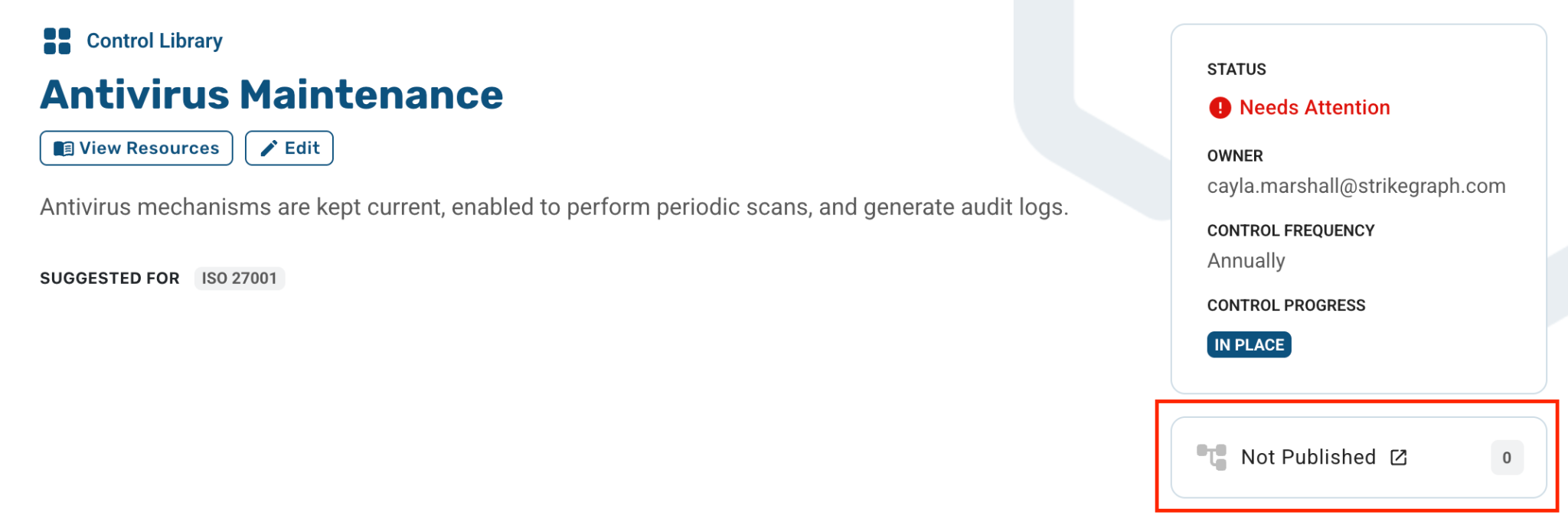
Review the available publishing options and select the data elements you want to include.
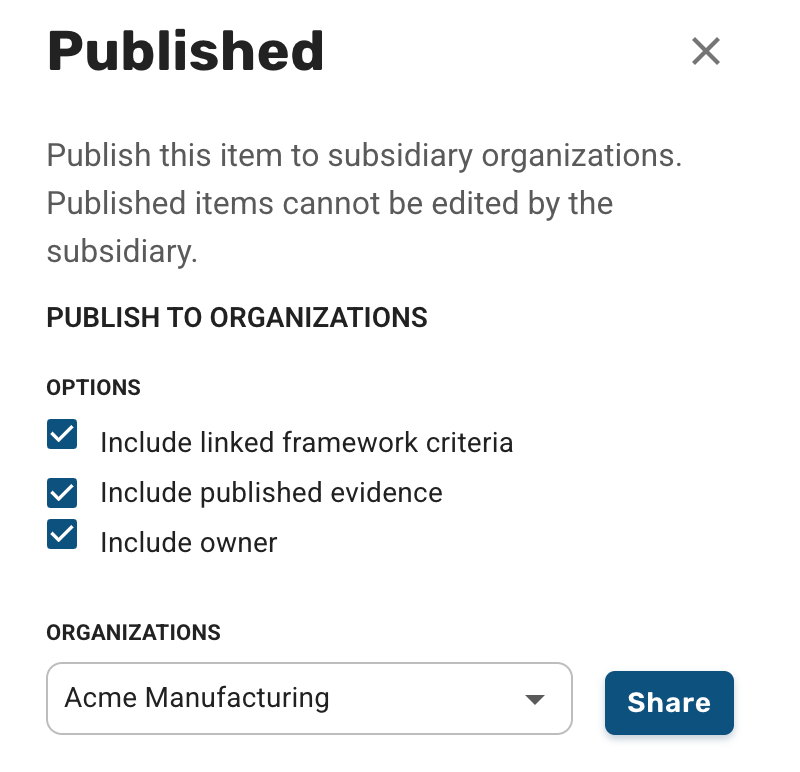
Once your selections are complete, choose the appropriate subsidiary organization and click “Share.”
After publishing, review any linked items to determine whether they should be published as well.
For example: related controls, evidence items, evidence attachments, or risks.
Controls
When deciding whether to publish a control, consider:
Should the subsidiary follow this exact process?
Yes: Publish the control.
No: The subsidiary can maintain its own version that reflects its specific implementation.
Should this control be centrally managed by the primary organization?
Yes: Publish the control.
No: The subsidiary can maintain a similar control that reflects its implementation.
Once a control has been published:
Primary organization responsibilities:
Ensure the control language is accurate and applicable to all published subsidiary organizations.
Regularly review and update the control to maintain accuracy.
Subsidiary organization responsibilities:
Review the published control.
Confirm that the subsidiary is following the defined process.
Evidence Items
When deciding whether to publish an evidence item, consider:
Should the evidence item metadata (e.g., expiration schedule, description, owner) be managed by the primary organization?
Yes: Publish the evidence item.
No: Subsidiaries can manage their own version with metadata that reflects their local implementation.
Once an evidence item has been published:
Primary organization responsibilities:
Ensure evidence item metadata remains accurate and relevant for all published subsidiaries.
Review and update the item regularly to keep it current.
Decide which (if any) evidence attachments should also be published to subsidiaries.
Subsidiary organization responsibilities:
Review the published evidence item.
Add additional attachments if needed to meet evidence requirements locally.
Evidence Attachments
When deciding whether to publish an evidence attachment, consider:
Should the attachment be managed by the primary organization?
Yes: Publish the evidence attachment.
No: Subsidiaries can maintain their own version that reflects their local implementation.
Does the evidence attachment accurately represent the subsidiary’s implementation of the linked control?
Yes: Publish the evidence attachment.
No: Subsidiaries can maintain a similar attachment that reflects their implementation.
Once an evidence attachment has been published:
Primary organization responsibilities:
Refresh and re-publish attachments as needed.
Note: Attachments are not auto-published to subsidiaries. Each update must be manually published.
Subsidiary organization responsibilities:
Review the published attachment to confirm it accurately reflects the subsidiary’s control implementation.
Note: If the attachment does not apply to the subsidiary, the subsidiary should notify the primary organization
Risks
When deciding whether to publish a risk, consider:
Is the risk applicable across multiple subsidiaries?
Yes: Publish the risk.
No: Subsidiaries can maintain their own version reflecting their unique assessment.
Should the risk be centrally managed by the primary organization?
Yes: Publish the risk.
No: Subsidiaries can manage their own version that aligns with their local assessment.
Once a risk has been published:
Primary organization responsibilities:
Monitor and update the risk annually or as significant business changes occur
Subsidiary organization responsibilities:
Review the published risk.
Determine whether additional, subsidiary-specific mitigations or monitoring activities are needed.
Questions?
Reach out through our chat feature for real-time Customer Success support 5 AM-5 PM PT Monday through Friday.
Was this helpful?