Vendor Risk Register, Third Party SOC 2, and Vendor Due Diligence Template
Use of this template contributes to the satisfaction of the Vendor Risk Register, Third Party SOC 2, and Vendor Due Diligence controls
Written By Micah
Understanding the risks that arise from working with vendors is an important part of any information security program. Use the Vendor Risk Register template below in conjunction with the guidance in this article to fulfill the following controls:
A video demonstration of how to utilize the Vendor Risk Register template can be found here.
Vendor Review Using the Vendor Risk Register Sheet
What vendors need to be included on the sheet?
This vendor review should, at minimum, include all IT vendors that significantly impact your business. The litmus test for “significant impact” varies; when in doubt, it is best to include a vendor in the review. Speaking generally, include any vendors where your core application or business offering would be disrupted if you suddenly lost access to the service. Vendors who store any PII should always be included. At minimum, all vendors who are instrumental in the operation of the in-scope product from the end-user's perspective should be included in this sheet.
General Vendor Review
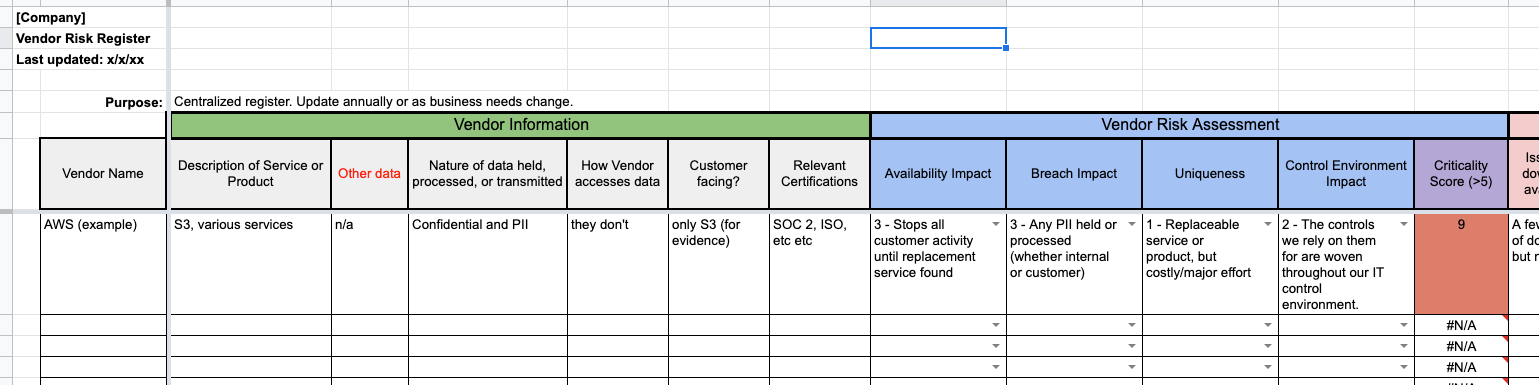
The first step in this process will be to review your existing vendors using our Vendor Risk Register sheet. This review will include identifying whether a vendor holds PII or customer information and assigning risk scores for Availability, Breach, Uniqueness, and Control Environment for each vendor on the register.
Availability: What would the impact be if you suddenly lost access to the service?
Breach: Would a data breach at this vendor possibly disclose PII, customer information, or confidential company data?
Uniqueness: How easy would it be to find a replacement for the vendor?
Control Environment: Does this vendor perform security controls that you rely on? For example, AWS provides physical security and backup services for the infrastructure that hosts the Strike Graph platform. We are relying on AWS to provide these controls on our behalf.
Critical Vendor Review
Once you have scored your general vendors, review the Criticality Score for each vendor calculated. That calculation is generated automatically by the sheet. Any vendor with a score greater than five is labeled a critical vendor.
For each critical vendor, request and review that vendor’s SOC 2 report. If that vendor does not have a SOC 2 report but they have another security attestation or certification (ISO 27001, FedRAMP, or similar), that can be used in place of a SOC 2 report.
If you're new to reviewing a vendor's SOC 2 report, check out this article!
Critical Vendor Review (Lacking a Compliance Certification)
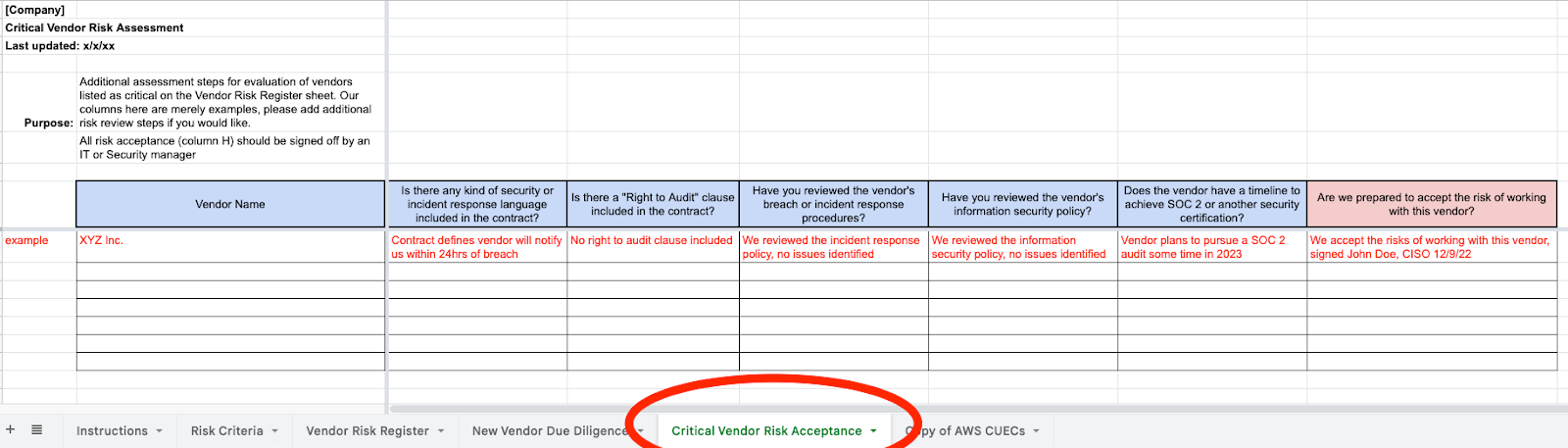
If you have a critical vendor that does not have any security certification, you should log them on the Critical Vendor Risk Acceptance tab (see screenshot below). This tab will walk you through a few more questions to ask of your vendors to help get some additional assurance regarding their security processes in place of a formal security report like a SOC 2 report.
Consider any of the following based on the risk profile of the vendor; keep in mind these are simply example criteria we have provided. If you want to ask different questions of your vendors or have already had your vendor complete a security questionnaire, that can be used here instead of our example questions.
Is there any security or incident response language included in the contract?
Is there a "Right to Audit" clause included in the contract?
Have you reviewed the vendor's breach or incident response procedures?
Have you reviewed the vendor's information security policy?
Does the vendor have a timeline to achieve SOC 2 or another security certification?
Once you have answered these questions, you will be asked to fill out column H in which someone from IT or Security management formally accepts the risk of working with a critical vendor who does not have a SOC 2 or other security certification.
Critical Vendor SOC 2 Review (or Similar Certification)
Reviewing the SOC 2 reports for your current vendors is a key way to gain insight into the security controls they are performing and whether those controls are operating effectively. Vendor SOC 2 review involves three steps, listed as separate columns in our vendor risk sheet. SOC 2 review only needs to be performed for vendors ranked as Critical on the Vendor Risk Register tab.
SOC 2 Review Period Dates:
Request the SOC 2 report from your critical vendors. Larger vendors like AWS, Microsoft, and Google all have compliance portals where you can download their most recent SOC 2 report. For smaller vendors, you may need to reach out to your point of contact with the vendor directly.
Determine if the SOC 2 report is current or whether a new report or bridge letter is required. All Type 2 SOC 2 reports will note their Review Period on the cover page of the report. If the end of the review period is more than one year from the date you are performing the vendor review, you should contact the vendor and request a new report.
If the end of the review period is more than six months ago (for instance, the end of the review period noted on the report was 4/30/22, and it is now after 10/30/22), and you are particularly concerned about the status of the vendor’s controls, you can request a bridge letter. This is not required for the audit, but it can be useful to give you extra assurance that a vendor’s controls have not changed since their last SOC 2 audit occurred.
If the provided report is current, note the review period dates in the SOC 2 Review Period Dates column on the sheet.
SOC 2 Exceptions Noted:
Exceptions are noted on an audit report when an auditor determines that a certain control was not designed or operating effectively during the review period of the audit. It is important to review any exceptions noted on your vendor’s SOC 2 reports to determine whether the exception affects your business. Some exceptions are fairly minor like one current employee finishing their annual security training late. Other exceptions can be more serious like changes being pushed to production without testing or approval.
See below for instructions on how to find exceptions within a SOC 2 audit report:
Scroll down to Section 5 of your vendor’s SOC 2 report. This is where management responds to any exceptions noted in the report, so if you see a response to an exception noted here, you can tell there was an issue noted. Note: sometimes vendors include language in this section that is unrelated to a specific exception, so read what is included in this section closely to see if the vendor is specifically addressing a finding made by the auditor, or to see if the vendor is just including additional information on their security practices.
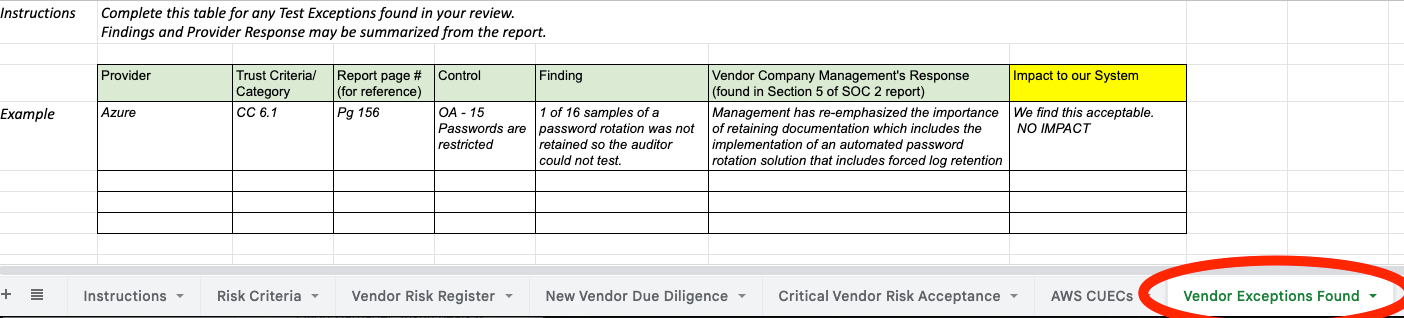
Copy management’s response to the exception noted into the tab Vendor Exceptions Found on the vendor risk sheet.
Scroll up to find the specific control that the auditor found the exception for. This will be found within Section 4 of the report, where the specific tests the auditor performed are listed. All controls without exceptions should have “no exceptions noted” listed on them, whereas the control with the exception identified will have language that reads “exception noted…” or something similar.
Once you’ve identified the specific control, copy the relevant information into the sheet and identify whether the exception caused any impact on your system or service that relies upon the vendor.
SOC 2 Complementary User Entity Controls (CUEC) Review
CUECs are activities that your vendors specifically define in their SOC 2 reports as being your responsibility as the customer/entity using their service. These include things like setting your own passwords, reporting issues to the vendor, and other activities that the vendor wants to specify is your responsibility to perform as a customer. Therefore, it is important to review the CUECs they have defined to ensure that you have a process in place for the items listed.
See below for instructions on how to perform a CUEC review based on your vendor’s SOC 2 audit report:
Take screenshots and copy the CUECs into a separate tab for the vendor (see the example where we have pulled AWS’s CUECs into a tab for review). The CUECs will always be listed at the end of the Section 3 of the SOC 2 report. You can also do a keyword search for “complementary user entity controls.”
Once you have inserted screenshots of the CUECs into a tab on our sheet, you should read through them and identify whether you need to implement additional security controls in response to anything listed by the vendor. Most of the time, CUECs are fairly straightforward things like “user entities are responsible for provisioning users to the service” and “user entities are responsible for assigning admins.” But sometimes, there are things listed that may require the addition of a security control or a new process to address.
Once you have completed your review, note any additional processes or controls you think may be necessary. If nothing stood out to you, leave a statement noting that you performed a review and note the date.
New Vendor Due Diligence
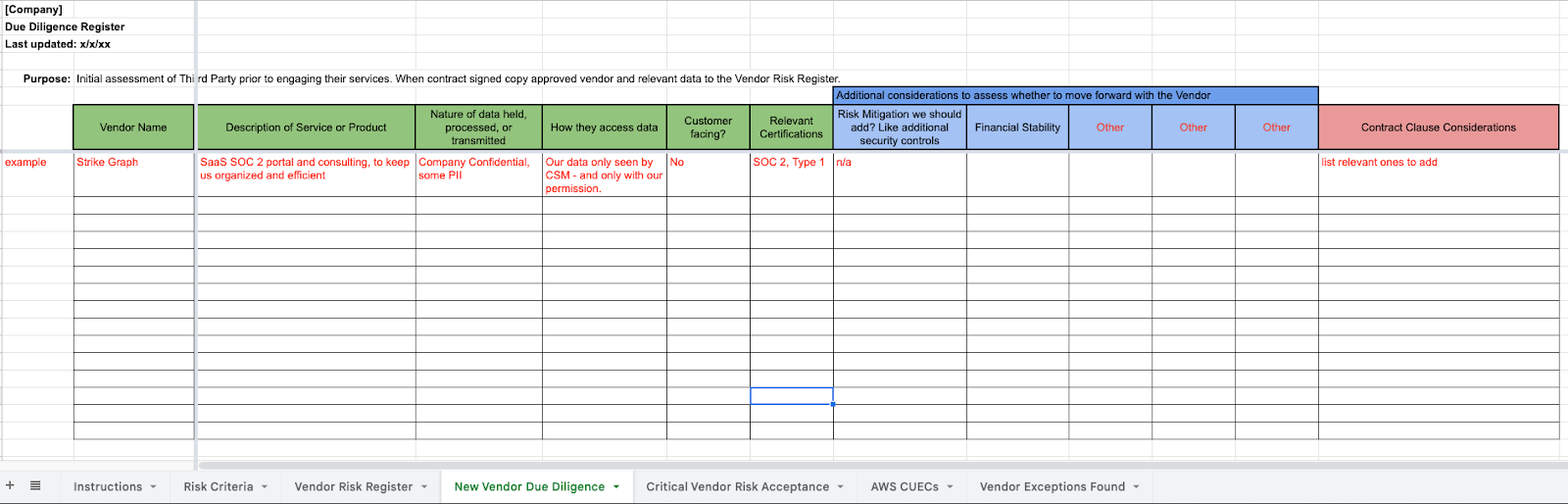
As part of your vendor management process, new vendors should also be reviewed to identify their impact on your systems, as well as whether the introduction of the vendor should come with the implementation of new security controls. You can also identify whether specific security-related contract clauses would be appropriate for the new vendor.
Any new major IT vendors that you onboard should have a line item included on the New Vendor Due Diligence tab to show that some cursory due diligence was performed over the vendor prior to working with them.
Was this helpful?