Control frequency
Learn about control frequency and it differs from an evidence item's expiration schedule
Written By Micah
A control is an activity that is performed to specifically address risk. A good control will not only define who (or what) will perform the activity, but also how often (or how frequently) the activity is performed.
Control frequency is how often a control will be performed, based on the risk the control is mitigating. This frequency can vary depending not only on the type of control but the size of the organization too.
For example, in a small organization (with minimal staff), a control for User Access Review may only need to occur once a year (or annually), but the same control in very large organizations (with lots of staff and high turnover) may be needed once every 3 months (or quarterly) to adequately mitigate the risk of improper access to technology systems.
In Strike Graph, you define the control frequency for any given control in the edit modal. Controls can be edited directly from the Control Library using the utility menu or from a control's detail view using the edit button located near the control's name. Control owners can further monitor assigned controls, statuses, and frequencies by utilizing the filters and monitoring tools available in the Control Library, helping them streamline management processes.

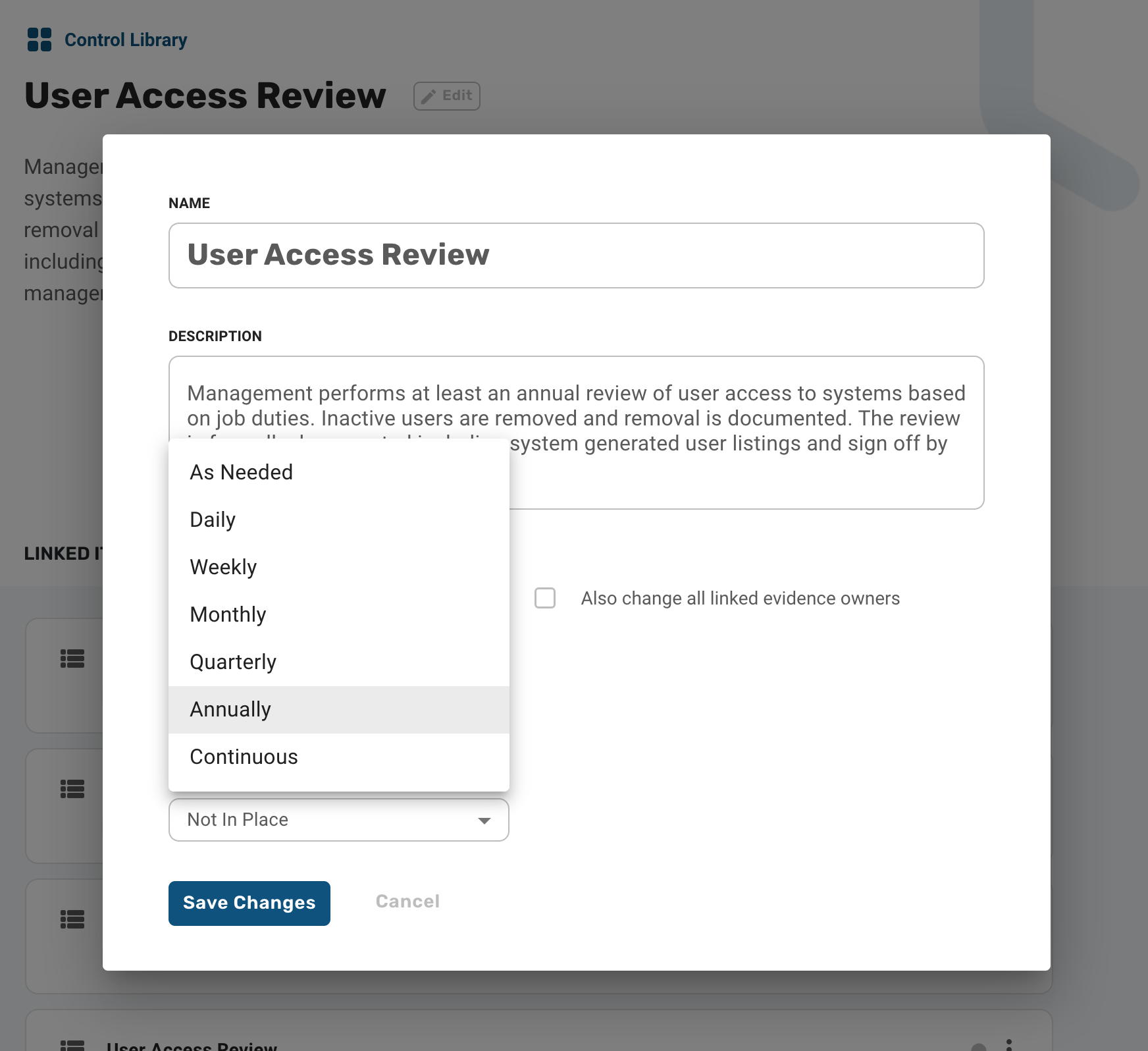
Controls have the following options for frequency:
As Needed
Daily
Weekly
Monthly
Quarterly
Annually
Continuous
Managing Continuous Frequency Controls
Managing Continuous frequency controls in Strike Graph involves understanding notification roles and effectively utilizing evidence expiration schedules. Key aspects include:
Control Owners: Receive initial notifications upon assignment but can oversee assignments, statuses, and frequencies in the Control Library.
Evidence Owners: Main recipients of reminders, critical for ensuring evidence-related actions are timely completed. To optimize notifications for continuous workflows:
Navigate to evidence item settings within the relevant control.
Adjust the expiration cadence for evidence based on workflow needs.
Save changes to improve notification alignment and action efficiency.For Continuous frequency controls, notifications are primarily managed through evidence expiration schedules rather than direct control reminders. This ensures evidence owners receive timely updates aligned with control requirements.
What about the Evidence Expiration Schedule?
The evidence expiration schedule is how often you plan to collect evidence to show that the control is operational, usually in preparation for an internal or external audit or for continuous compliance purposes.
In most cases, the evidence expiration schedule will mirror the control frequency, however, they are not linked and do not need to be the same. Evidence may satisfy multiple controls and can be linked to any controls (to streamline evidence collection), and controls may have varying frequencies. For this reason, we recommend that you set control frequency and evidence expiration schedule independently depending on the needs of your organization. Evidence owners play a key role in maintaining control compliance by receiving notifications based on the evidence expiration schedule. These reminders ensure timely evidence submission and help streamline compliance operations.
The evidence expiration schedule not only defines when evidence attachments expire but also how often evidence owners receive evidence status reminders and/or how often automated collection uses configured integrations to attempt to recollect the evidence attachment. For Continuous controls, evidence owners are central to the notification process, consistently receiving updates as determined by the expiration cadence to ensure smooth operation of compliance workflows.
Questions?
Reach out through our chat feature for real-time Customer Success support 8 am - 5 pm PT Monday through Friday.
Was this helpful?